
How can I troubleshoot electrical issues with my stairlift at home before calling for professional assistance?
For basic stairlift electrical troubleshooting, check that the lift is switched on, securely parked on its charging point, receiving mains power and not affected by a tripped circuit breaker. You can also check the handset batteries and any clearly displayed fault message, but do not remove covers or work on internal wiring—if these checks do not restore operation, contact a qualified stairlift engineer.
Basic stairlift electrical troubleshooting can usually be limited to checking the power supply, charging position, handset batteries and any visible fault indicators. These checks may restore operation safely, but do not remove covers, test internal wiring, bypass safety devices or attempt repairs inside the stairlift. If the lift remains inoperative, contact a qualified stairlift engineer.
Before carrying out any checks, make sure the stairlift is unoccupied and stationary. Keep hands, clothing and other objects clear of the rail, carriage and footrest. If you notice smoke, sparking, a burning smell, melted plastic, unusual heat or signs of water damage, stop using the lift immediately. If it is safe to do so, switch off its local power supply and arrange urgent professional assistance.
Check the stairlift is switched on
- Check the on/off switch, key switch or isolator, depending on the design of your stairlift. It can sometimes be switched off accidentally during cleaning or when furniture is moved nearby.
- Make sure the key is inserted and turned to the operating position if your model uses a key switch.
- Check that the armrests, seat and swivel mechanism are fully in their normal travelling position. Some stairlifts will not move if a safety interlock has not engaged.
Check the mains supply
- Confirm that the stairlift’s plug is firmly inserted, where the installation uses a standard plug and socket. Do not use an extension lead or adaptor as a substitute for the installed supply.
- Check whether nearby lights or sockets are working. A local power cut or a switched-off socket can prevent the batteries from charging.
- Look at the consumer unit for a tripped circuit breaker or residual current device. If the circuit has tripped, reset it only once if there is no sign of damage, moisture or burning. If it trips again, leave it off and call an electrician or stairlift engineer rather than repeatedly resetting it.
- If other electrical equipment has also lost power, check whether there is a wider power cut. The stairlift may continue briefly on its batteries, but it will eventually stop if mains power is not restored.
Confirm that the lift is charging
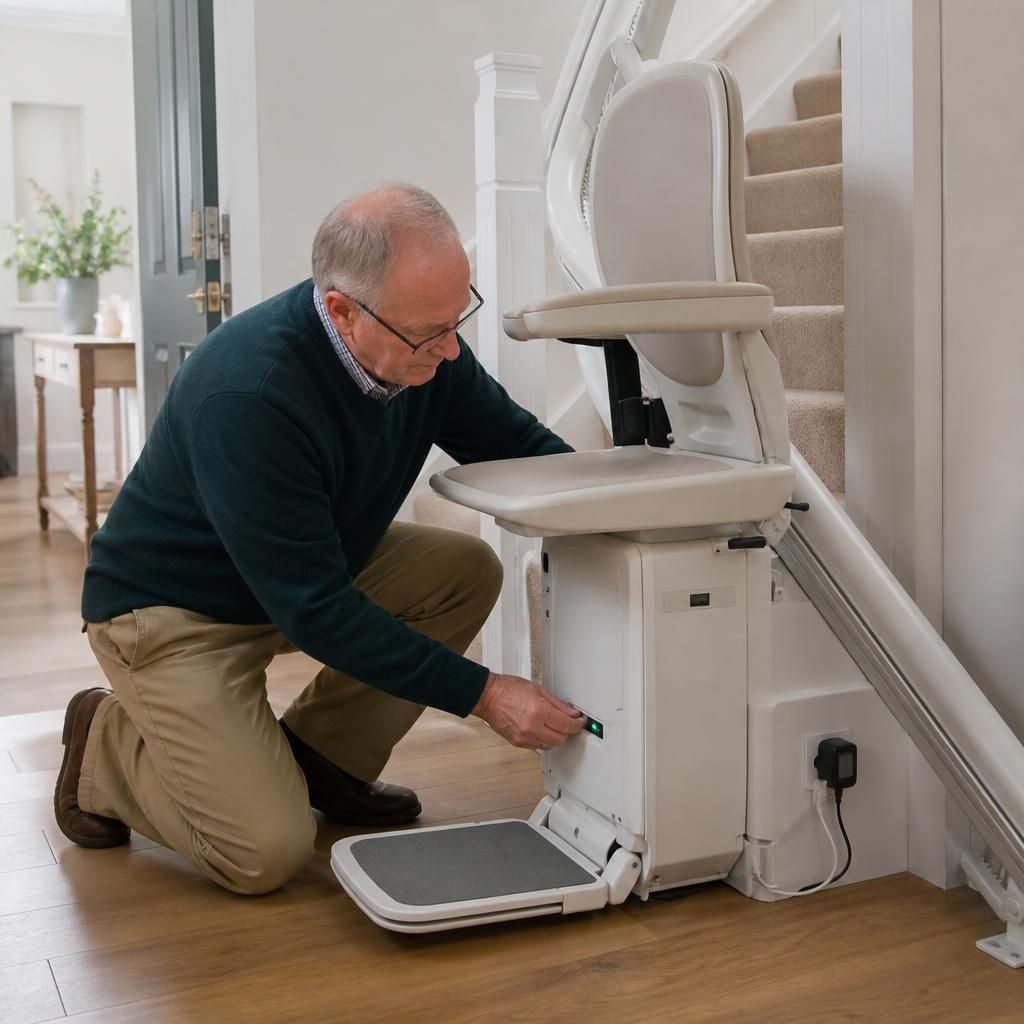
Most stairlifts charge through contacts on the rail or at a designated charging point. Park the lift fully at its normal charging position and look for the charging light, display symbol or other indication described in the user manual. On some installations there may be charging points at both ends of the stairs, while others use one fixed position.
- Check that the carriage has travelled completely into the charging position rather than stopping just short of it.
- Inspect the visible charging contacts for dust or an obvious obstruction. If cleaning is permitted in your manual, switch off the stairlift’s power first and use only a clean, dry cloth. Do not use liquid, abrasive materials or metal tools.
- Leave the lift parked correctly and connected to its power supply. A stairlift that has been left off charge may need time to recover before it will operate normally.
If the charging indicator never appears, the lift loses power quickly, or it only operates while connected to the charger, the batteries or charging circuit may need testing. Battery replacement and charging-system checks should be carried out by a trained engineer; do not connect an alternative charger or attempt to access the battery compartment unless the manufacturer specifically identifies it as a user-serviceable part.
Check the handset or remote control
- Try the other control if your stairlift has both a control on the armrest and a remote handset. This helps identify whether the issue is limited to one control.
- Replace the handset batteries if the buttons do not produce a light, sound or response. Fit the correct type and orientation shown in the handset instructions.
- Make sure the handset is being used within its normal range and is not obstructed by a wall, cupboard or other object. Some remote controls may also need pairing or synchronising after battery replacement; follow the instructions for your specific model.
- Do not continue pressing the control if the lift does not respond or if an alarm is sounding. Repeated commands will not correct a power or safety-interlock fault.
Read the visible fault indication
Look for a fault code, warning light, audible alert or message on the display. Record exactly what you see, including whether it is flashing or accompanied by a sound, and consult the user manual for the stated user checks. A code may indicate low battery charge, that the lift is not parked correctly, an engaged safety edge or a control problem. Do not assume that clearing a message has repaired the underlying fault.
If your model has a user reset button, use it only in the way described in the manual and only after checking that the stairlift is safely positioned. Do not repeatedly reset the lift, hold down controls to force movement or bypass an interlock. A reset that fails, or a fault that returns after resetting, requires professional investigation.
When to stop troubleshooting
Arrange assistance if the stairlift will not move after the basic checks, will not charge, repeatedly trips the electrical supply, shows a persistent fault code, or stops partway through its travel. Do not attempt to move a stranded passenger by pulling the chair or carriage, and do not use the stairlift if it is jerking, overheating or making an electrical buzzing sound. If someone is left on the stairs and cannot move safely, seek appropriate help while keeping the stairlift switched off until an engineer advises otherwise.
When contacting Independent Stairlifts, provide the stairlift make and model if known, the symptoms, any displayed code, whether the lift is on a charging point, and which checks you have already completed. This information helps the engineer distinguish a supply problem from a battery, control or safety-circuit fault and prepare the appropriate assistance.
The safest electrical checks you can carry out at home are to confirm that the stairlift is switched on, connected to its mains supply and parked correctly on its charging point. Check for a charging light or display symbol, and make sure the plug, socket and nearby power supply appear undamaged. If the consumer unit has tripped, reset the relevant breaker only once, provided there is no smell of burning, moisture, sparking or visible damage.
Do not remove covers, handle internal wiring, bypass safety switches or connect an alternative charger. If the stairlift still will not move, does not charge, repeatedly trips the electrical supply or displays a persistent fault, switch it off if safe and contact a qualified stairlift engineer. Tell them the make and model, any fault message and the checks you have already completed.
Need professional help with your stairlift’s electrical fault?
If your stairlift still will not move, charge or reset after these safe checks, contact Independent Stairlifts for professional assistance. Tell us the make and model, any fault message and the checks you have completed so we can advise on the next step.