
What maintenance practices can I adopt at home to aid in the longevity of my lift chair, complementing professional services?
To help your lift chair last longer, follow the manufacturer’s instructions, keep the upholstery and moving areas clean, keep the mechanism and footrest clear, and check the power lead, handset and connections for visible damage. Avoid spills, overloading and forcing the chair, unplug it before cleaning, and arrange professional attention for unusual noises, jerky movement, overheating or electrical faults rather than attempting repairs yourself.
Regular home care can extend the working life of a lift chair by reducing dirt, moisture, strain and avoidable electrical damage between professional services. The most useful practices are to follow the manufacturer’s instructions, keep the chair and its mechanism clear, clean it correctly, inspect the handset and power cable, and report faults before continued use causes further damage.
Follow the operating and care instructions
Keep the user manual in an accessible place and use the chair only as intended. The manual will identify the permitted user weight, suitable cleaning products, charging requirements where applicable and any restrictions on positioning. Do not force the chair through its movement range, stand on the footrest, sit on the raised footrest or allow anyone to sit on the armrests. These actions can place excessive strain on the frame, motor and lifting mechanism.
Use the handset controls smoothly and avoid repeatedly operating the chair without allowing the mechanism to complete its movement. Keep children and pets away from the chair while it is reclining, lifting or returning to its seated position, as moving parts can create trapping points.
Keep the chair and surrounding area clean
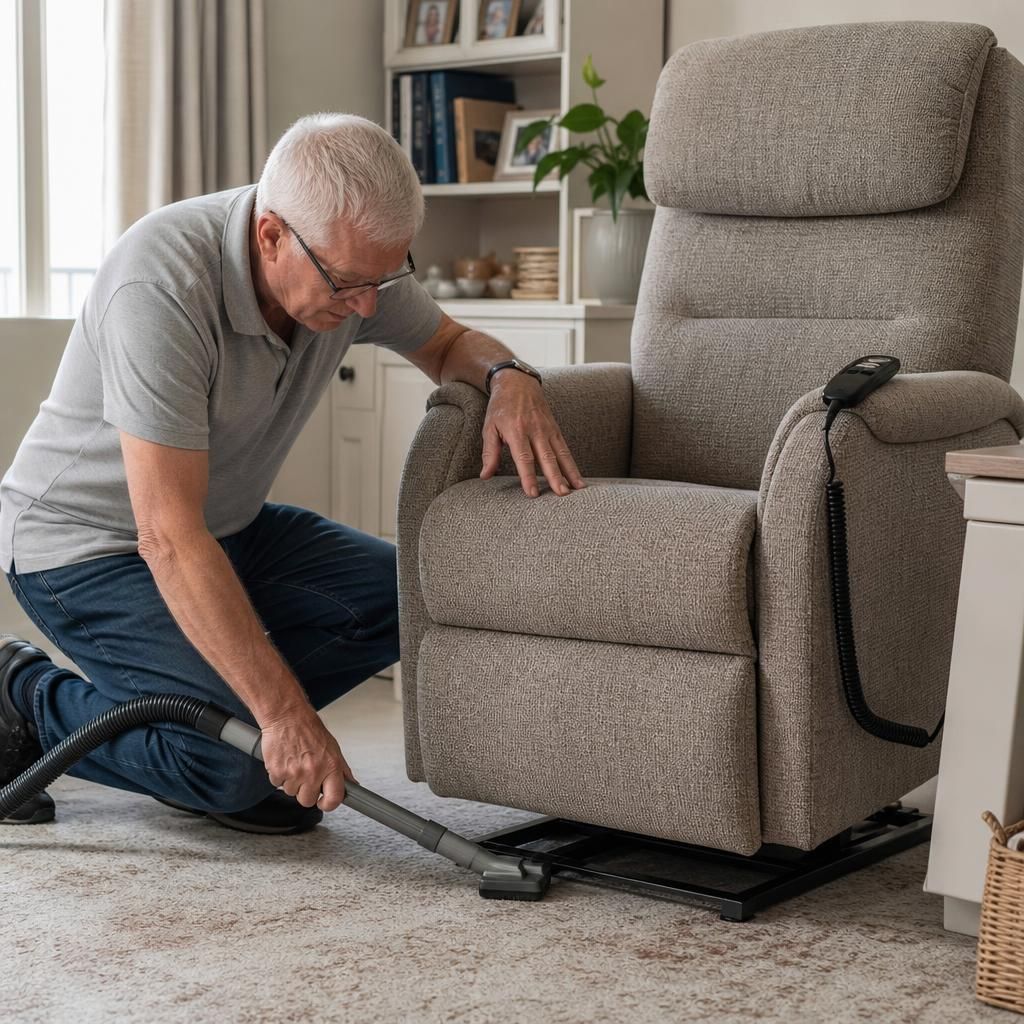
Dust, crumbs, pet hair and other debris can work into the base and moving parts. Vacuum the upholstery seams, underneath the chair and around the footrest regularly, using an attachment that will not damage the fabric or leather. Remove loose debris from around the mechanism without reaching into moving parts.
Clean upholstery in accordance with the manufacturer’s instructions. Use only suitable products and apply them to a cloth rather than pouring or spraying liquid directly onto the chair. Keep moisture away from the handset, motor, electrical connections and control box. Deal with spills promptly, but unplug the chair from the mains first if it is safe to do so and keep it disconnected until the affected area is completely dry.
Protect the mechanism and footrest
Leave sufficient space around and behind the chair for it to recline and rise without striking a wall, furniture or another obstruction. Check the floor area before operating the chair, particularly if rugs, cables, toys or pet items could become trapped beneath the footrest or base.
Do not place heavy objects on the footrest or use it as a seat. Avoid storing items underneath the chair, since they may interfere with the mechanism or become caught when it moves. Do not attempt to lubricate joints or gears unless the manufacturer specifically instructs you to do so. Incorrect lubricants can attract dirt, affect electrical components or interfere with parts that require specialist adjustment.
Inspect the power supply and handset
Carry out a visual check of the mains lead, plug, transformer, handset cable and accessible connections. Look for cuts, crushing, exposed wires, scorch marks, loose connections or signs that a cable has been pinched by the chair. Make sure the lead is routed so that it cannot be caught under the base or become a trip hazard.
Use the power supply recommended for the chair and connect it as described in the manual. Do not use the chair if the plug, cable or electrical housing is damaged, if there is a burning smell, or if the power supply becomes unusually hot. Do not dismantle the handset, motor or control box, and do not replace electrical parts with an unapproved alternative. Unplugging the chair before cleaning or inspecting it reduces risk, but never pull the cable to remove the plug.
If the chair has a battery backup, follow the manufacturer’s charging and replacement instructions. Battery performance can decline over time, so report failure of the backup function during a professional service rather than opening the battery compartment or attempting an improvised replacement.
Use a simple inspection routine
When the chair is stationary, check that its upholstery, seams and padding remain secure and that there are no loose screws, damaged covers or exposed components. During normal operation, notice whether it moves smoothly and evenly. Changes such as jerking, hesitation, unusual clicking or grinding, increased operating noise, a drifting footrest or difficulty returning to the seated position should not be ignored.
Keep a note of intermittent problems, including when they occur and whether they affect a particular direction of movement. This information can help a professional identify the cause more efficiently. Do not continue operating the chair repeatedly to test a fault, particularly if it stops part-way, smells of overheating or makes a new mechanical noise.
Arrange professional attention when needed
Home maintenance is intended to prevent avoidable wear and identify concerns early; it is not a substitute for servicing, adjustment or repair. Stop using the chair and contact the appropriate support team if it becomes unstable, moves unevenly, fails to respond correctly, trips the electrical supply, shows visible wiring damage or produces smoke, sparks or a burning smell. Keep clear of the mechanism and isolate the power only if this can be done safely.
Professional servicing can include checks that are not suitable for a homeowner, such as examining the motor, drive system, frame, limit switches, wiring, battery backup and safety controls. Avoid modifying the chair or using non-approved parts, as this may create a safety risk and could affect the manufacturer’s warranty. Combining sensible cleaning and visual checks at home with scheduled professional maintenance gives the lift chair the best opportunity to remain safe, reliable and comfortable for longer.
Keeping the lift chair clean and free from obstructions is one of the simplest ways to reduce avoidable wear between professional services. Dust, crumbs, pet hair and loose objects can interfere with the footrest, base or moving mechanism.
- Vacuum the upholstery seams, beneath the chair and around the footrest using a suitable attachment.
- Keep rugs, cables, toys and pet items away from the chair’s operating area.
- Do not store objects beneath the chair or place heavy items on the footrest.
- Clean the upholstery only with products approved by the manufacturer, applying them to a cloth rather than spraying the chair directly.
- Keep moisture away from the handset, motor, control box and electrical connections.
Before operating the chair, check that it has enough space to recline and rise without striking furniture or a wall. Never reach into the mechanism while it is connected to the power supply or moving. If the chair becomes noisy, jerky or difficult to operate after cleaning, stop using it and arrange professional advice rather than attempting to lubricate or adjust internal parts yourself.
Arrange Professional Lift Chair Maintenance Support
If your lift chair shows unusual noise, jerky movement, electrical damage or any other fault, stop using it and arrange professional lift chair maintenance support. Contact Independent Stairlifts to book an assessment or discuss the next steps.